First fix, second fix, and a photo of both before the boards go up.
Once the plasterer’s been, your cable runs, back boxes and containment are gone for good. Banksman keeps a photo record of what went where, puts the socket and lighting layouts on every phone, and shows you which jobs are ready for second fix.
- Four fields and you're straight into the real app, no card, ever
- Every plan includes every feature, from £79/month inc. VAT
- Speak to Dom or Matt: real people, no call centres

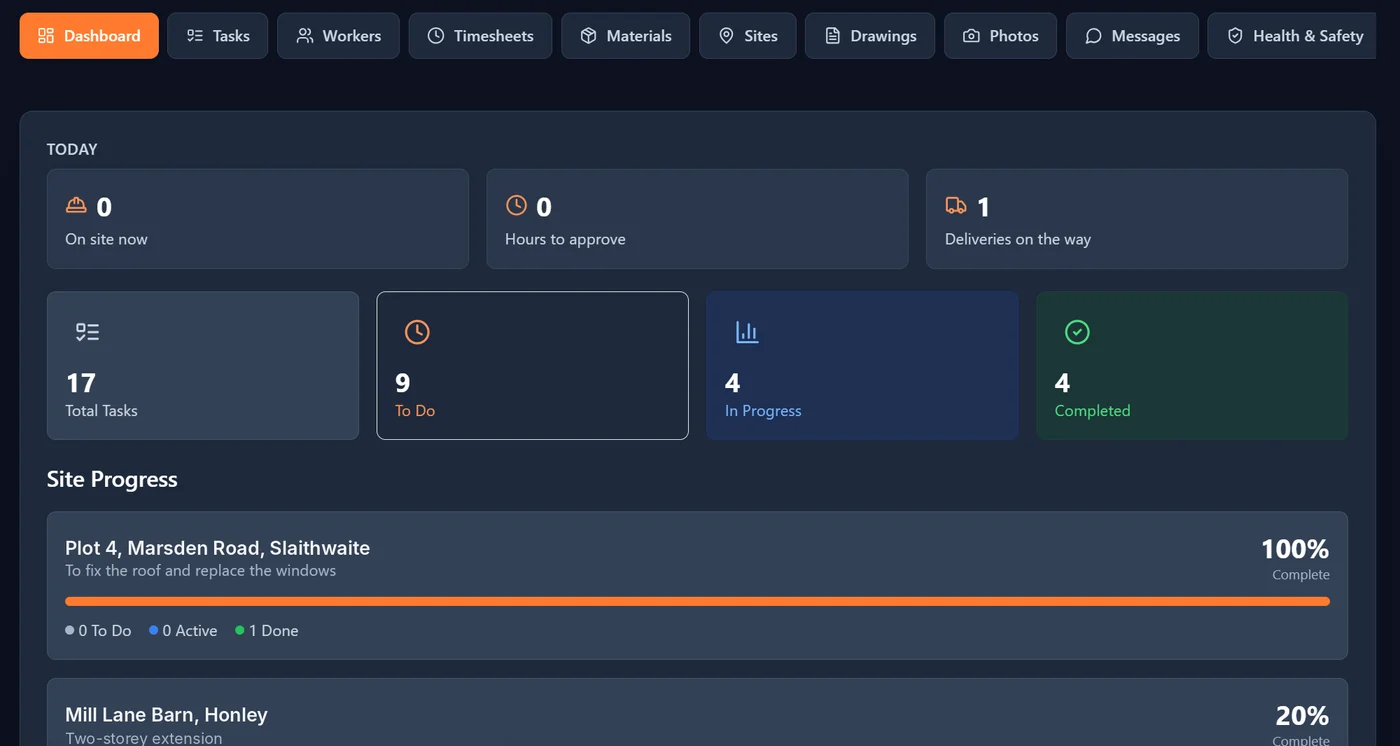
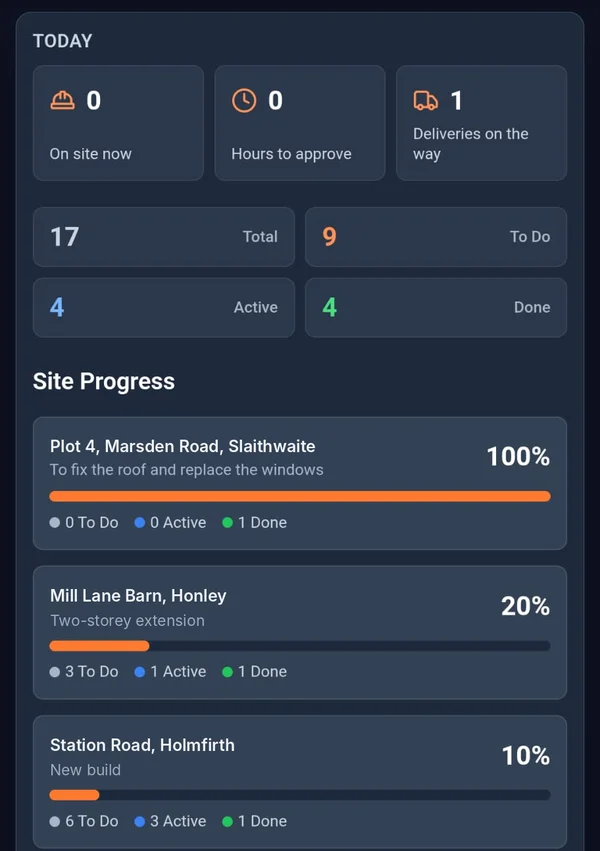

What disappears behind the plasterboard.
- The problem
Nobody can say where the cable runs once the walls are boarded.
A kitchen fitter puts a screw through a cable and it’s your firm they ring.
With BanksmanPhotograph the first fix before it’s covered. Each photo is stamped with the upload time from our server, the site, the task and who took it, so you can find it again when you need it.
- Photo library
- The problem
Sockets put in where the old layout said.
The client changed the kitchen. The drawing in the van is the old one.
With BanksmanThe layouts go on every phone, sorted by site and labelled by version, so the lads can check they’re working off the right one.
- Drawings for every site
- The problem
You don’t know which jobs are ready for second fix.
Lads spread across four houses, and the only way to find out is to ring each of them.
With BanksmanSet first fix and second fix as tasks for each site. When they’re ticked off with a photo, you can see where every job is up to from one screen.
- Tasks with photo proof
- Push notifications
What you get.
Photo library
Every photo is stamped with the upload time from our server, the site, the task and who took it. Location is optional, set by the company.
Drawings for every site
Drawings on every phone, labelled by version, sorted by site and downloadable on site.
Tasks with photo proof
The manager sets the task for each site, with a trade, priority and due date. The worker ticks it off and adds the photo to prove it. Filter by site, trade, status or priority.
Push notifications
Notifications go straight to the phone, so updates don’t sit unread.
Timesheets
Daywork hours or price work per site or plot. The manager approves or queries with a reason, the worker fixes and resubmits. Grouped by week ending, CSV export, archived when paid.
Material requests
The worker asks for the item, quantity, unit and needed-by date. Tracked from requested to approved, ordered, dispatched and delivered (or declined), with supplier, order ref, expected delivery and a delivery photo.
Site group chats and direct messages
A group chat for every site, plus direct messages, kept apart from your personal phone chats.
Guided tour
A guided tour walks new users round the app the first time they log in.
Health and safety documents with sign-off
Inductions, RAMS and safety procedures on every phone. Each worker reads and signs with their finger, a new revision asks everyone to sign again, and you see who has signed what.
Labour cost per job
Approved hours times each worker’s rate, so you can see what a job is costing in labour.
Being built now.
These aren't in the app yet. They're marked "Coming soon" until they are.
Card and certificate expiry tracking Coming soon
Keep track of CSCS, CPCS and other cards, and see what’s about to run out.
Worth a read.
- Site management · 2 min readHow to Stop Losing Drawing Revisions on SiteOut-of-date drawings on site cause rework and disputes. Here's why it keeps happening and how to make sure everyone's working off the current version.Read the guide →
- Site management · 2 min readWhy WhatsApp Groups Are a Liability on a Construction SiteWhatsApp is fine for a quick message, but it's a poor way to run a construction site. Here's why, and what to use instead.Read the guide →
- Site management · 4 min readHow to get your building site off WhatsApp (without losing the lads)WhatsApp groups work until they don't. A bricklayer's guide to moving your site's tasks, photos, hours and drawings somewhere you can actually find them.Read the guide →
Free tools and comparisons
Straight answers.
How do electricians record first fix before it is plastered over?
Photograph the cable runs and back boxes in each room before boarding or plastering, and keep the photos against the site and task. Banksman stamps each photo with the upload time from our server, the site, the task and who took it, so you can find it years later.
Is there a job management app for small electrical contractors?
Yes. Banksman tracks first fix and second fix as tasks on every site, keeps layouts on every phone, logs hours and handles material requests, from £79 a month inc. VAT for up to 10 users.
Does Banksman produce electrical test certificates?
No. Banksman is for running the job: tasks, photos, drawings, hours and materials. Keep using your certification software for test results and certificates.
Can the lads see updated socket layouts on site?
Yes. Layout drawings go on every phone, sorted by site and labelled by version, so the team can check which version they are working from.
Can I track first and second fix across several houses?
Yes. Set first fix and second fix as tasks per plot or site. Each one is ticked off with a photo, and the dashboard shows progress across every site, so you know which houses are ready for the next visit.
Can apprentices and electrician’s mates use it?
Yes. Everyone gets their own login. Each person sees their own tasks and deadlines on the worker dashboard, and can switch to bigger text to read it easily on site.
Can I order cable, accessories and consumer units through the app?
Yes. The team requests materials with the quantity, unit and needed-by date; the office approves and orders, adds the supplier and expected delivery, and the delivery is tracked through to a photo of the drop.
Can electricians log daywork for variations?
Yes. Daywork and price work go on the same timesheet but stay separate, so extra work on a price job is clear. The manager approves or queries hours with a reason before they go to wages.
Does Banksman work out labour cost per job?
Not yet. Labour cost per job, worked out from approved hours and each worker’s rate, is being built and is marked "Coming soon" until it is live.
Know where every job’s up to.
The live demo is the actual app on realistic sample data. Four fields and your logins are on the next page. No card.
Speak to Dom or Matt: real people, no call centres.
Dom: 07508 300353 · Matt: 07964 660071